
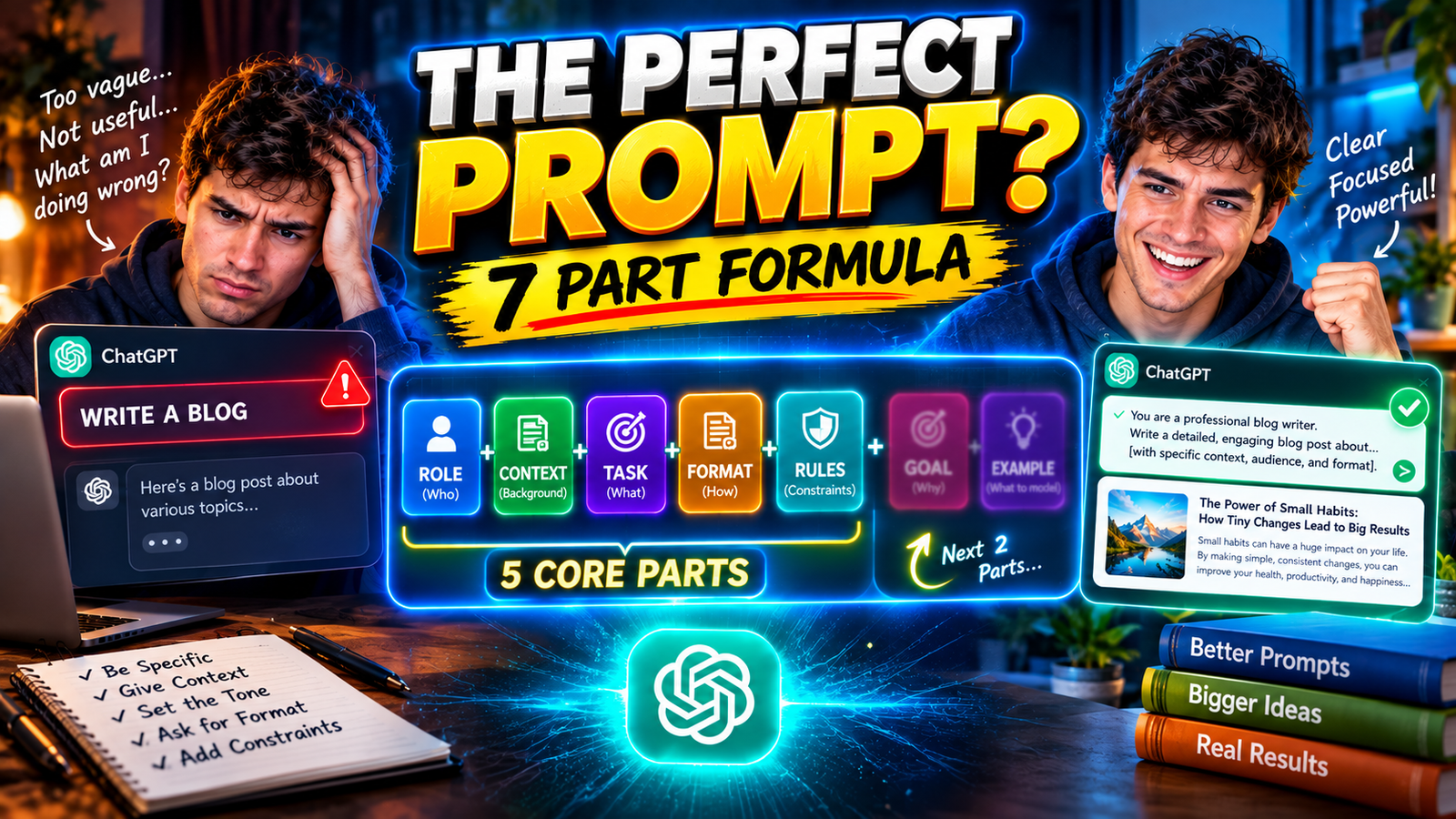
You may have asked ChatGPT to create something, explain a topic, or assist with a task, only to receive responses that were overly generic or veered off topic.
Often, the fault lies not with ChatGPT, but with the nature of the instructions you provided.
A vague prompt forces ChatGPT to guess, whereas a clear prompt guides it along a precise path.
In this guide, you will learn a simple formula for crafting ChatGPT prompts, understand their seven essential components, and explore practical examples that you can apply to your business, education, writing, and daily tasks.
Key Takeaways
- The ChatGPT prompt formula enables you to craft clear and precise AI instructions.
- It comprises seven essential elements: role, task, context, objective, constraints, output format, and examples.
- The length of a prompt is not the measure of its quality; rather, the clarity of instructions is paramount.
- Precise details help ChatGPT gain a deeper understanding of your expectations.
- Using real-world examples can further refine the quality and style of the response.
- You can save useful prompts to leverage them repeatedly for routine tasks.
- Do not forget to review the responses provided by ChatGPT, as even with extremely clear instructions, there is no absolute guarantee of 100% accurate results.
What Is the Perfect ChatGPT Prompt Formula?
Using a ChatGPT prompt formula is a simple and effective way to create clear and direct instructions. It helps ChatGPT truly understand what you are asking and provides answers that align with your needs and expectations.
Here is the formula:
Role + Task + Context + Goal + Constraints + Output Format + Examples
It is not mandatory to include every element in every instruction. For addressing a brief query, a single action and some basic information might suffice. However, for a large-scale project such as writing an article or formulating a business strategy, it may be necessary to follow the complete framework.
For example:
Basic prompt:
Write an article about AI.
Better prompt:
Write a 1,000-word beginner-friendly article explaining how AI helps people in daily life. Use simple English, practical examples, clear H2 headings, and a friendly professional tone.
The second prompt gives ChatGPT a much clearer direction.
You may also like this article :- How to Use ChatGPT for College Essays
Why Is a Good ChatGPT Prompt Important?
An excellent prompt gives ChatGPT a precise understanding of your tasks, audience, objectives, and expectations. The answers you receive are genuinely helpful, so there’s no need to have useless, repetitive conversations.
Imagine telling a person:
Write an email to my manager.
They would probably ask, “About what?”
The same problem happens with ChatGPT. It does not know whether you want to request leave, discuss a project, report a problem, or ask for a promotion.
A clearer prompt would be:
Write a polite email to my manager requesting two days of leave for a family event. Keep it short, respectful, and natural. Include a clear subject line.
The improved version explains the situation, tone, and expected format.
You may also like this article :- Best AI Image Generator Free No Sign Up in 2026
What Are the 7 Elements of a Perfect ChatGPT Prompt?
The seven useful elements are role, task, context, goal, constraints, output format, and examples.
1. Role: Who Should ChatGPT Act As?
A role tells ChatGPT what perspective may be useful.
For example:
Act as a patient English teacher who explains difficult topics in simple language.
You can use roles such as:
- English teacher
- SEO content writer
- Career coach
- Business consultant
- Study planner
- Friendly editor
- Or any role that fits your task
You do not need to use dramatic phrases like “act as the world’s greatest expert.” Choose a role that actually matches your task.
2. Task: What Do You Want ChatGPT to Do?
The task is the main instruction. Start with a clear action word.
Examples:
- Explain photosynthesis.
- Rewrite this email.
- Create a study timetable.
- Summarize this report.
- Suggest blog topics.
- Write a blog post.
- Compare two products.
Instead of saying:
Help me with my blog.
Say:
Suggest 10 beginner-friendly blog topics about AI tools for everyday people.
The cleaner the work, the less ChatGPT will have to guess.
3. Context: What Background Information Does It Need?
Context explains the situation behind your request.
For example:
I am a college student preparing for an English exam, and grammar rules are difficult for me.
This helps ChatGPT adjust its explanation. Without context, it may provide an answer that is correct but not suitable for your level.
Simple rule: Share the details that could change the answer or adapt the situation.
4. Goal: What Do You Want to Achieve?
The goal explains why you need the answer.
For example:
Explain the difference between “affect” and “effect” so I can use both correctly in my exam.
The task is to explain the words. The goal is to help you use them correctly.
This distinction helps ChatGPT understand whether you want to learn something, make a decision, complete a project, or teach someone else.
5. Constraints: What Limits Should It Follow?
Constraints are the boundaries you give ChatGPT.
They may include:
- Word count
- Language
- Tone
- Reading level
- Target audience
- Topics to include
- Things to avoid
- Desired format
For example:
Use simple English, keep the answer within a 300-word limit, include three examples from daily life, and provide it to me in document format.
This is useful when you want a short, focused answer instead of a long explanation.
6. Output Format: How Should the Answer Look?
The output format tells ChatGPT how to organize the response.
You can ask for:
- Bullet points
- A comparison table
- A step-by-step guide
- An email
- A checklist
- A lesson plan
- A blog outline
- Social-media captions
- Desired format
For example:
Present a brief summary of this topic in a short paragraph, followed by a table and five practice questions.
This is especially helpful when you plan to use the answer in a document, presentation, blog post, or spreadsheet.
7. Examples: What Should the Result Look Like?
Examples help ChatGPT get a feel for your preferred style, tone, and format. They are particularly useful when you want the response to follow a specific pattern.
For example:
Write the introduction in a friendly, conversational style similar to this sample: “You do not need to be a technology expert to start using AI.”
You can share a sample email, paragraph, headline, or format. ChatGPT can use it as a reference while following your instructions.
Examples are optional, but they are useful when you want a particular writing style or output.
You may also like this article :- Grammarly vs QuillBot Which Is Better?
A Quick Comparison Table to understand 7 Elements of ChatGPT Prompt
| Element | What it tells ChatGPT | Example |
|---|---|---|
| Role | Which perspective to use | Act as a patient teacher |
| Task | What to do | Explain photosynthesis |
| Context | Background information | The learner is 12 years old kid |
| Goal | Desired outcome | Help the student to prepare for an exam |
| Constraints | Limits to follow | Use simple English |
| Output format | How to structure the answer | Use bullets points and real life examples |
| Examples | What the result should resemble | Follow this sample style |
How Do You Write a Good ChatGPT Prompt Step by Step?
Follow these steps when creating a prompt:
- Identify exactly what you want ChatGPT to do.
- Add the background information it needs.
- Explain your main goal.
- Mention the target audience, tone, or reading level.
- Set useful limits such as length or language.
- Choose the format you want.
- Add a role or example if it would improve the result.
- Remove unnecessary instructions.
- Review the answer and improve the prompt if needed.
For example, if ChatGPT gives you a general answer, you can reply:
This answer is too general. Make it more practical, use three everyday examples, and explain each point in simple English.
You do not have to write the perfect prompt on your first attempt. Prompting is often a conversation. You give an instruction, check the result, and make the next instruction clearer.
You may also like this article :- ChatGPT vs Gemini for Students
ChatGPT Prompt Examples That Show the Formula
Example 1: Writing a Blog Post
Weak prompt:
Write a blog about AI tools.
Better prompt:
Act as an experienced SEO content writer. Write a beginner-friendly blog post about AI tools for everyday people. Use simple English, practical examples, clear H2 headings, and a friendly professional tone. Aim for approximately 1,000 words.
Example 2: Studying for an Exam
Weak prompt:
Explain photosynthesis.
Better prompt:
Act as a patient science teacher. Explain photosynthesis to a 12-year-old student using simple English and an everyday example. Explain the role of sunlight, water, and carbon dioxide. End with five short practice questions and answers.
Example 3: Writing a Professional Email
Weak prompt:
Write an email to my manager.
Better prompt:
Write a polite email to my manager requesting two days of leave for a family event. Keep it concise, respectful, and natural. Include a clear subject line.
Example 4: Planning a Routine
Weak prompt:
Make me a routine.
Better prompt:
Act as a practical productivity coach. Create a realistic weekday routine for a working professional who has two hours available for learning after work. Include meals, exercise, rest, and learning in a simple timetable.
Example 5: Improving Existing Writing
Weak prompt:
Improve this paragraph.
Better prompt:
Act as a friendly English editor. Improve the grammar and clarity of the paragraph below while preserving my original meaning and personal voice. Do not add new facts or make the writing overly formal.
The key to a good prompt is clarity. It should clearly describe what you want and what the outcome should be. It is not about how many words you use, but rather how well you communicate the idea.
You may also like this article :- Best Free AI Writing Tools for Students 2026
What Is the Best ChatGPT Prompt Template for Beginners?
You can use this reusable template for many tasks:
Act as a [role].
Your task is to [describe the task clearly].
Context:
[Share the relevant background.]
Goal:
[Explain what you want to achieve.]
Requirements:
- [Requirement 1]
- [Requirement 2]
- [Requirement 3]
Output format:
[Explain how you want the answer structured.]
Use simple language suitable for [target audience]. If important information is missing, ask me a clarifying question first.
You can remove any section that does not apply.
For a simple request, this shorter template may be enough:
Explain [topic] to [audience] in simple English. Use [number] examples and keep the answer under [word count] words.
You may also like this article :- AI Tools Every Beginner Should Know in 2026
What Mistakes Make ChatGPT Prompts Less Effective?
Some common mistakes include:
- Giving vague instructions
- Providing no context
- Asking for several unrelated tasks at once
- Forgetting to mention the audience
- Using conflicting instructions
- Adding too many unnecessary rules
- Expecting ChatGPT to know your preferences automatically
- Asking for a “perfect” answer without defining success
- Treating the response as automatically accurate
- Failing to review and refine the result
For example:
Make a good business plan.
is too broad.
A clearer version would be:
Create a simple business plan for a local drinking-water advertising business in New York. Explain the target customers, revenue model, marketing strategy, startup costs, and possible challenges. Use clear headings and a practical tone.
If a task appears overwhelming, break it down into smaller, manageable parts. Instead of trying to fulfill all requirements such as research, business outlining, promotion, and presentation in one go, complete each step separately, one by one.
You may also like this article :- Common AI Myths That Are Completely Wrong
What’s Next? Practice the ChatGPT Prompt Formula
The easiest way to master prompting is to improve a prompt you already use.
Try this:
- Find one vague prompt from an earlier ChatGPT conversation.
- Rewrite it using Task + Context + Goal.
- Add a useful format requirement.
- Compare the new answer with the old one.
- Add any missing details.
- Save the improved prompt if you may need it again.
Start with simple tasks such as writing emails, studying, creating content, planning your week, or summarizing information.
You do not need to memorize complicated prompt formulas. Focus on explaining:
- What you want
- Why you want it
- Who the answer is for
- How the answer should look
You may also like this article :- How Professionals Are Using ChatGPT at Work (Real Examples)
Final Thoughts: Better Prompts Lead to Better ChatGPT Conversations
Crafting excellent prompts for ChatGPT does not mean writing a vast amount of text; rather, the true objective is to provide the AI with precise, clear, and well-structured information.
If you seek more accurate results in your professional work, education, writing, or daily life, incorporating seven key elements—role, task, context, objective, constraints, output format, and examples—can prove highly beneficial.
However, no single formula guarantees a 100% accurate answer. ChatGPT might misinterpret your instructions, overlook a crucial point, or present misleading information. Therefore, It is important that you review your answers (ChatGPT response) and revise your instructions as necessary.
You do not need to be an expert ‘prompt engineer’ to harness ChatGPT’s full potential; Simply stating your expectations clearly is enough.
With effective prompts, you can use AI to transform complex problems into simple, easy-to-understand solutions.
You may also like this article :- Best AI Tools for Homework, Research & Exams.
Written by: Vishal — AI Researcher & Blogger with 4+ years of experience making artificial intelligence simple, practical, and accessible for everyone.
Reviewed by: Vishal — Content reviewer responsible for verifying facts, figures, dates, and names using reliable and original sources.
FAQs
1. Do I really need a formula to write a good ChatGPT prompt?
Not at all; it is not mandatory to follow a complex set of rules every time you use ChatGPT. If your question is simple, a brief and clear instruction will suffice. However, when your goal is to achieve a specific outcome such as writing a blog post, creating a study outline, generating business ideas, drafting an email, or obtaining detailed information on a topic, using a prompt formula proves extremely beneficial. It helps ensure that you include key details such as the nature of the task, context, target audience, word count, and desired format.
2. What is the most important part of a ChatGPT prompt?
The most important aspect is to explain what you want with complete clarity. If your instructions are vague, ChatGPT will struggle to infer your intent. Providing context and specifying the desired format are particularly helpful. For instance, instead of simply saying “provide information on marketing,” phrase it like this: “Explain the concept of digital marketing to a beginner using three real-life examples, within a 500-word limit.” Doing so gives ChatGPT a precise guide to follow.
3. Does a longer ChatGPT prompt always give a better answer?
Not always. A long prompt can be helpful when the task is complex, but adding irrelevant details can simply cause confusion. The goal isn’t to make the prompt excessively long, but to include the right information. Focus on the task, include the essentials, state what you want, and leave out the unnecessary details.
4. What should I do if ChatGPT gives me a poor or completely wrong answer?
Do not make the mistake of immediately diving back into the task without careful thought. First, analyze what was missing from your original prompt. You might have overlooked providing clear instructions regarding your target audience, tone, word count, or desired format. Subsequently, provide a precise follow-up instruction, such as:
“This response is too generic. Explain it in simple English, provide three practical examples, and organize the information using clear headings.”
You can also guide ChatGPT by providing the missing information. Remember, prompting is essentially an ongoing process of questioning, reviewing, and continuous refinement; it is not a one-time effort.
5. Can I use the same ChatGPT prompt formula for work, study, and everyday tasks?
Yes, you can use this same basic formula for almost anything or any task. For work-related tasks, just consider who you are addressing, the deadline, and keep it professional. If you are studying, think about your education level, the subject, and what you want to learn. For everyday matters, perhaps just the task, the background, and how you want the answer. It is flexible, so include only those parts that actually help ChatGPT understand your query.
Pingback: How to Write a Killer Resume in the AI Era: Beginner's Guide
Pingback: How to Use NotebookLM for Studying
Pingback: How to Use AI to Write Better Emails
Good read! Sharing PPTOnline (/) — edit text and shapes, then export PPTX. PPTOnline
Pingback: How to Automate Repetitive Tasks With AI at Work
Pingback: AI Tools for Freelancers to Make Money in 2026