
Most students already have plenty of resources to study from – PDFs, lecture notes, books, slides, and other saved resources, but finding relevant information can take a lot of time. NotebookLM gives you a place where you can work with those materials, ask questions about them, and turn them into useful study resources, but simply uploading a PDF is just the beginning. In this guide, you will learn in detail how to use NotebookLM to understand topics in depth, prepare revision notes, practice questions and prepare for exams.
Note: Google renamed NotebookLM to Gemini Notebook in July 2026. The product remains available as a standalone notebook and research experience. Because many students still know it as NotebookLM, this guide uses the familiar name throughout.
Key Takeaways
- NotebookLM is an AI-powered research and study tool that helps you extract information from your documents.
- Students can use NotebookLM to understand difficult topics, summarize notes, ask questions about sources, and prepare material for revision.
- A useful study routine can be simple: learn the topic, ask questions, summarize it, practice, check your mistakes, and revise.
- With specific instructions & prompts, You can use your textbooks, PDFs, lecture notes and other study material to create revision notes, questions and other resources.
- Instead of just relying on summaries generated by AI, you should develop the habit of actively memorizing and practicing repeatedly.
- It is important to have a good source of information as NotebookLM’s responses are based on the content you provide.
- It is still necessary to confirm the important information & facts with your original notes, books, teacher or educational institution.
What Is NotebookLM and How Does It Work for Studying?
NotebookLM is an AI based research helper that helps you understand and discuss information from your given resources & documents. You can include things like PDFs, websites, YouTube videos, Google Docs, and Google Slides, and then ask questions related to those materials. According to Google, its answers may include direct references (citations) that lead you to the original information.
One useful thing for students is that NotebookLM works with the study material you provide, rather than giving you a general answer with no connection to your notes. For example, let’s say you have a 70-page biology PDF file. Instead of asking a simple question about biology from an AI chatbot, you can enter specific resources and material into NotebookLM and instruct it to explain photosynthesis based on your chapter.
This makes NotebookLM very useful when you have all your study material but it is difficult to organize it properly
Why Should Students Use NotebookLM for Studying?
NotebookLM can save you time when you’re working through a large amount of study material. You can use it to explain difficult topics, create summaries, and make practice questions from your notes. Google has also added flashcards, quizzes, learning guides, and other new ways to use original content to enhance learning.
For example, a college student preparing for an economics exam can upload their lecture slides and notes, request a summary of a lesson, and then create practice questions based on that information.
NotebookLM should be seen as a study assistant, not a substitute for study. You have to keep trying to read, think, memorize and understand information, solve problems, and investigate important questions on your own.
Google reported in January 2026 that an Oxford University pilot of its AI tools found 85% of survey respondents reported increased productivity and nearly 75% said the tools helped them work more effectively. These figures refer to Google’s AI tools broadly, not NotebookLM alone. — Source: Google
You may also like this article :- How to Write a Killer Resume in the AI Era: Beginner’s Guide
How Do You Use NotebookLM for Studying Step by Step?
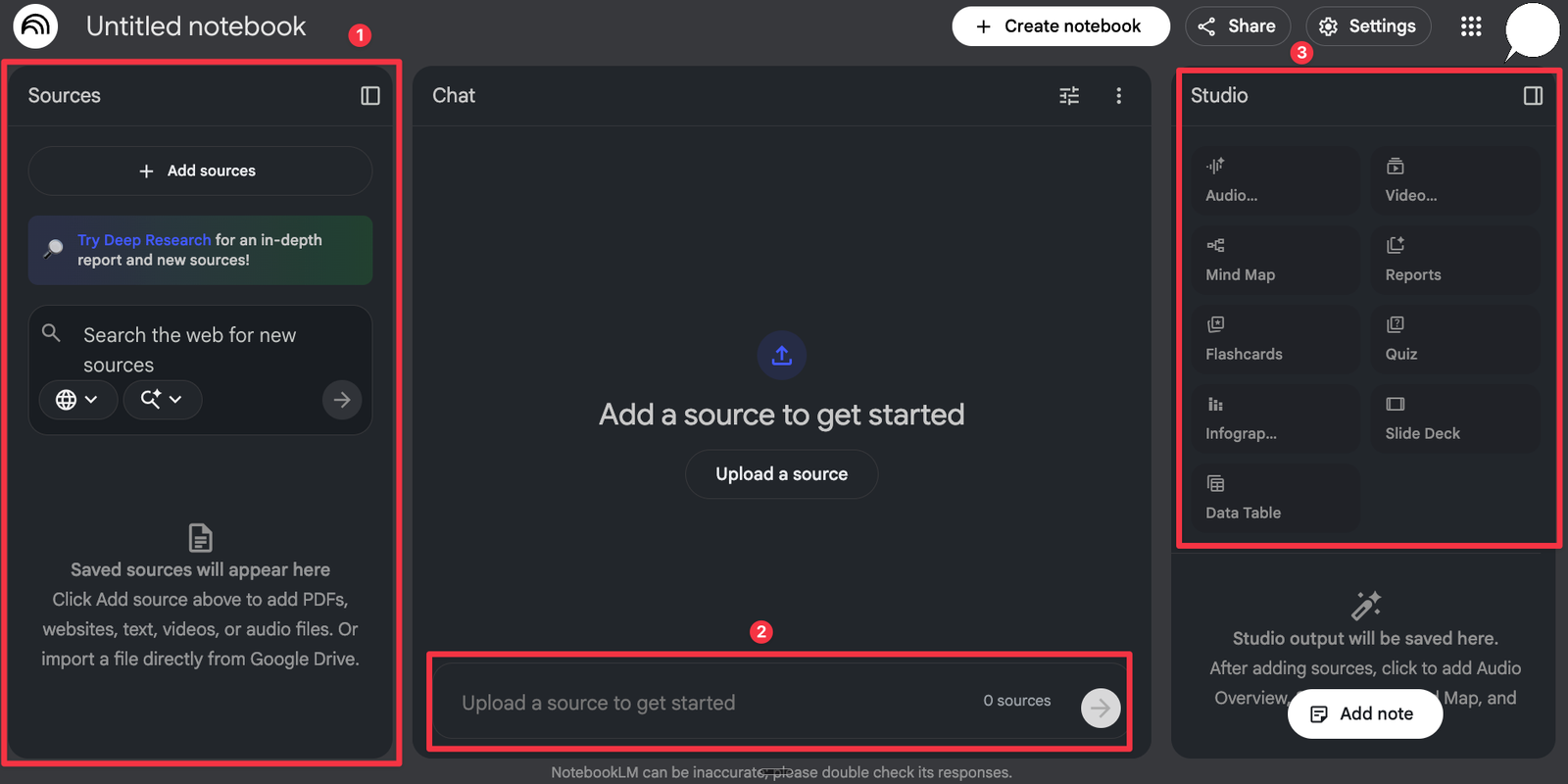
The easiest way to use NotebookLM for studying is to create a notebook on a topic, add relevant information to it, ask questions, make notes for revision, practice and then see what you need to improve.
1. Create One Notebook for a Subject
Start with one subject or exam rather than throwing everything into one notebook.
For example:
Notebook: Class 12 Biology — Human Reproduction
This keeps your questions and study material focused.
2. Add Your Study Materials
Next, add the study materials you actually use for that topic. Depending on your account and the current version of NotebookLM, you may be able to add PDFs, websites, YouTube videos, Google Docs, Google Slides and other supported sources.
For example, you might add your textbook chapter, teacher’s presentation, and your own lecture notes.
3. Ask Questions About the Material
Once your sources are ready, start asking specific questions.
Instead of:
“Teach me biology.”
Try:
“Explain the process of meiosis using only my uploaded sources. Start with a beginner-friendly explanation and then explain the important exam points.”
This prompt is more specific, so NotebookLM knows both what you want explained and which sources it should use.
4. Create a Summary or Study Guide
Once you’ve understood a chapter, you can ask NotebookLM to turn your notes into a shorter revision guide.
For example:
“Create a one-page revision guide from these notes. Include key concepts, definitions, important processes, and points I should remember for an exam.”
NotebookLM supports study guides and other generated formats from your sources.
How Can NotebookLM Help You Prepare for Exams?
NotebookLM can make exam preparation easier by transforming your study material into practice questions, flashcards, summaries and other revision tools. Google has introduced source-based flashcards and quizzes specifically for students to help them retain information better.
For example, after studying a history chapter, you could ask:
“Create 15 exam-style questions from this chapter. Start with five easy questions, followed by five medium and five difficult questions.”
Then test yourself before looking at the answers.
You can also ask:
“Quiz me one question at a time. Wait for my answer before asking the next question.”
The important part is that you are trying to remember the answer yourself instead of simply reading another AI-generated summary.
You may also like this article :- How to Use ChatGPT for College Essays
What Are the Best NotebookLM Prompts for Students?
A good NotebookLM prompt doesn’t need to be complicated. Just tell it what you want, which sources to use, how simple or detailed the answer should be, and what format you prefer.
Try these:
Explain a difficult topic:
“Explain this topic in simple language using only my uploaded sources. Give me one real-life example.”
Make revision notes:
“Create a one-page revision guide from these notes. Focus on concepts most likely to matter for my exam.”
Create practice questions:
“Give me 15 practice questions based only on these sources. Include a mix of easy, medium, and difficult questions.”
Find weak areas:
“Based on these materials, identify five concepts students are most likely to misunderstand and explain why.”
You can also ask NotebookLM to explain a concept twice: first like you’re a beginner, then at the level expected for your exam.
You may also like this article :- Master the Perfect ChatGPT Prompt Formula
How Can You Use NotebookLM for Active Recall and Revision?
You can keep a NotebookLM study session simple: Learn → Ask → Summarize → Practice → Check → Revise.
Suppose you have 45 minutes before dinner.
First 10 minutes: Read a section of your textbook and upload the relevant material.
Next 10 minutes: Ask NotebookLM about concepts you don’t understand.
Next 10 minutes: Create a short study guide and close your notes.
Next 10 minutes: Take a quiz or answer practice questions without looking at the material.
Final 5 minutes: Check your mistakes and return to the original source.
This approach is more useful than repeatedly asking AI to summarize the same chapter.
You may also like this article :- ChatGPT vs Gemini for Students
What Are the Limitations of Using NotebookLM for Studying?
NotebookLM is only as useful as the material you give it and the way you use its answers. If your sources are incorrect, incomplete or out of date, this can cause problems in your studies. Apart from this, Google also admits that there may be mistakes in the answers given by AI.
Avoid these common mistakes:
- Uploading incomplete notes and assuming they contain everything.
- Memorizing an AI summary without checking the original material.
- Using generated answers instead of solving problems yourself.
- Adding random sources that conflict with your course material.
- Uploading sensitive personal or private information unnecessarily.
- Ignoring your teacher’s or institution’s rules about AI use.
The goal is not to make AI do the studying for you. The goal is to make your own study time more focused.
You may also like this article :- Best AI Tools for Homework, Research & Exams.
Which NotebookLM Features Can Help Students?
NotebookLM can turn your study material into different formats, including study guides, quizzes, flashcards, mind maps and audio overviews. These features are detailed in Google’s current support documentation, but availability may vary depending on your ID, plan, device, and update.
A simple way to think about them is:
Study problem | Useful NotebookLM feature |
“I don’t understand how topics connect.” | Mind Map |
“I need a quick revision.” | Study Guide |
“I keep forgetting definitions.” | Flashcards |
“I want to test myself.” | Quizzes |
“I want to review while travelling.” | Audio Overview |
What's Next? Build Your Personal NotebookLM Study Routine
A simple way to get started is to choose one chapter and use NotebookLM throughout a complete study session.
Pick one chapter, upload the relevant material, ask five or ten useful questions, create a revision guide, and test yourself.
Google says more than 30 million people and over 600,000 organizations were using NotebookLM before its July 2026 renaming to Gemini Notebook. – Source: Google
You don’t need to become an AI expert to use it. Start with one real study problem and see whether NotebookLM helps you solve it.
You may also like this article :- How Students Can Use AI to Study Smarter?
Conclusion
NotebookLM can help students transform scattered learning into an organized and active learning approach. You can use it to understand difficult texts, summarize notes, ask questions, prepare tests, correct errors, and prepare for exams.
But don’t let convenience become a shortcut around learning.
Use NotebookLM to study smarter, not to avoid studying. Read the original material, ask better questions, test your memory, check your mistakes, and use AI as a study partner rather than a replacement for your own thinking.
Written by: Vishal – AI Researcher & Blogger with 4+ years of experience making artificial intelligence simple, practical, and accessible for everyone.
Reviewed by: Vishal – Content reviewer responsible for verifying facts, figures, dates, and names using reliable and original sources.
FAQs
1. Can I use NotebookLM to study for an exam even if I’m a complete beginner?
Yes. You don’t need to be an AI expert to use NotebookLM to help you study. Simply choose a topic or lesson, upload your study material and ask simple questions about things you don’t understand.
For example, you can ask NotebookLM to explain a difficult topic in simple terms and then highlight the important points for the exam. Start with one chapter or topic rather than uploading everything at once. That makes it easier to keep your questions focused.
2. Can NotebookLM make notes and questions from my study material?
Yes. This is a great way to use NotebookLM to study. With its help, you can create revision notes, summaries, practice questions, quizzes, flashcards and other study material from your uploaded files.
For example, after you read a chapter in history, you can ask it to create 15 questions of different levels (easy, medium and difficult). Try to solve them yourself before seeing the answers. This way, you’re not just reading your notes — you’re also testing what you actually remember.
3. Is it okay to rely on NotebookLM's answers when preparing for an exam?
It’s better not to rely on them blindly. NotebookLM can make studying easier, but it should be your study assistant, not your replacement for studying.
If an answer is important, compare it with your textbook, class notes, teacher’s material, or another reliable source. This is especially important when your uploaded material is incomplete or when you’re studying something where a small mistake could affect your exam answer.
4. What should I upload to NotebookLM before I start studying?
Start with the material you actually need for that subject or exam. This could include texts from your books, class notes, teacher-provided slides, work PDFs, or other related materials.
You don’t need to upload all your study material. If your notebook is limited to a specific topic, it will be easier to understand the information and ask the right questions.
5. What is the best way to use NotebookLM for studying instead of just asking it for summaries?
Try using it as part of a study cycle: Learn → Ask → Summarize → Practice → Check → Revise.
For example, read a section yourself first, then use NotebookLM to clarify anything you don’t understand. Next, prepare a short revision guide and close your notes. Then test yourself with questions or quizzes. Finally, compare your mistakes with the real information and correct where you went wrong.
This method is much better than asking NotebookLM for a summary of the same chapter again and again. The goal is simple: use NotebookLM to support your understanding, memory and practice — not to do the learning for you.