
AI tools can help freelancers with writing, graphic design, video editing, and other client work. But using these tools is only part of the job. Knowing which tools exist is useful, but it doesn’t tell you which service to offer or whether clients will pay for it. The harder part is choosing a service that solves a real problem for a client.
This article compares eight AI tools, explains the freelance services you can use them for, and walks you through the first steps without spending much upfront.
Key Takeaways
- AI can help you work faster, but getting paid still depends on your skills, the quality of your work, and finding clients.
- Freelancers can offer AI-assisted writing, graphic design, video editing, SEO research, and simple business automations.
- Before committing to paid subscriptions, those just starting out can refine their skills using free plans.
- Show potential clients two or three strong samples and explain clearly what you can do for them.
- Check every deliverable yourself. Make sure the facts are correct, the work fits the client’s needs, and private information stays protected.
- Rather than getting lost exploring every available AI tool, it is far wiser to focus on one specific service when starting out.
What Are AI Tools for Freelancers to Make Money?
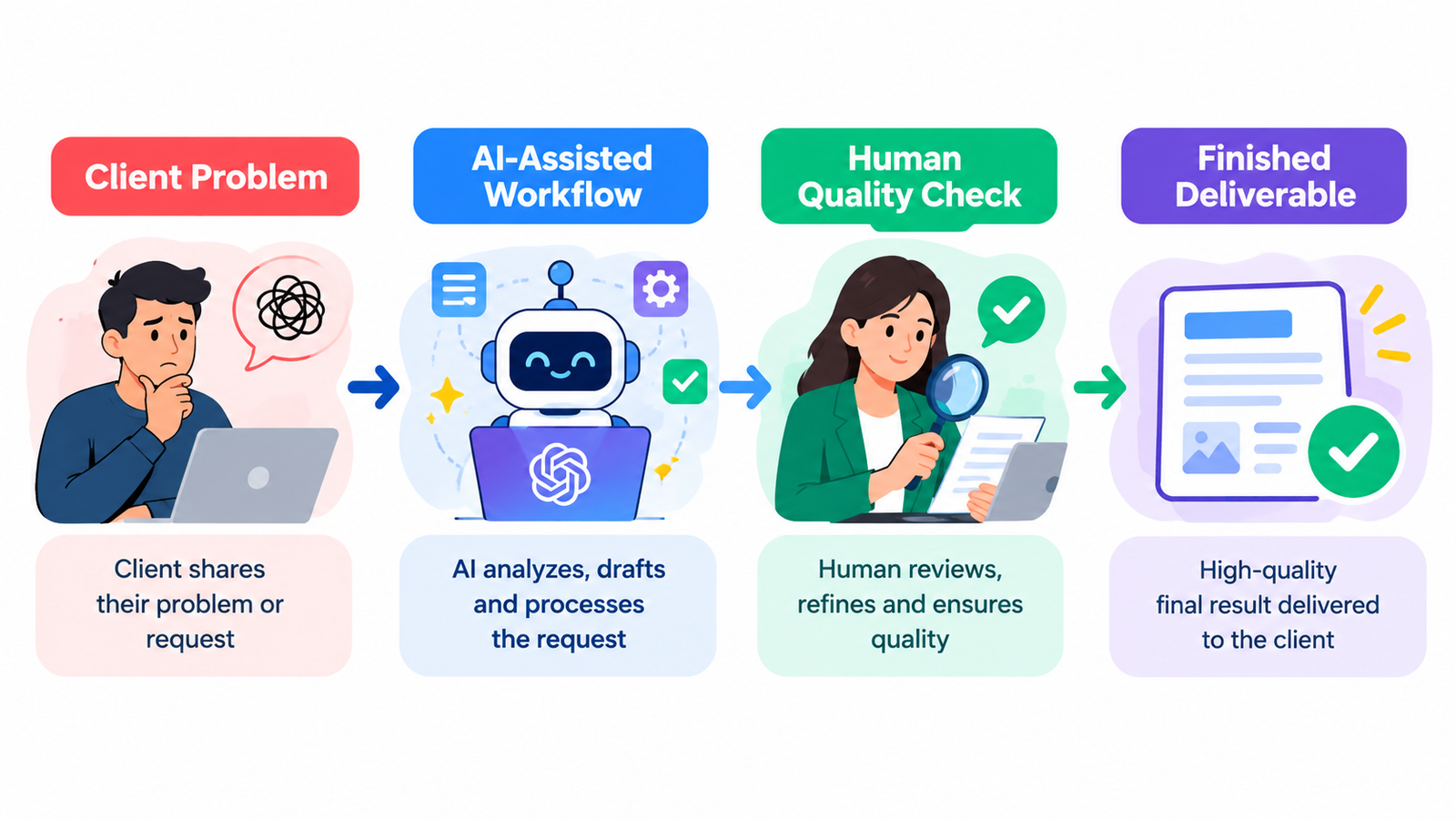
AI tools are apps that help freelancers with tasks such as drafting content, creating designs, editing videos, researching keywords, or automating routine work. Freelancers still need to check the results and make sure they meet the client’s requirements. For example, a freelancer might use ChatGPT to generate an initial draft of a product description; they can then tailor that draft to match the style and tone of an online store, while also verifying and ensuring the accuracy of the specific details related to each product.
Clients aren’t paying you just because you use AI. They’re paying for the finished work and the problem it solves. Your value comes from understanding what the client needs, producing good work, communicating clearly, and fixing problems when they arise.
Why Are AI Tools Useful for Freelancers in 2026?
AI tools can save time on repetitive tasks, help you brainstorm ideas, and give you a first draft to work from. You still need to decide what is useful and correct. For example, someone managing social media for a local bakery could use AI to draft captions for new products, weekend offers, and seasonal specials. They would then edit the captions to match the bakery’s voice and plan when each post should go live.
However, increased speed does not automatically translate to higher earnings. Working faster doesn’t guarantee more income. You still need to find clients, check your work, handle revisions, and keep track of your expenses.
What Are the Best AI Tools for Freelancers?
Choose a tool based on the work you want to sell. Here are eight options, what freelancers can use them for, and the skill level each may require.
AI tool | Freelance service | Starting cost | Skill level |
Blog drafts, product descriptions, research support | Free plan available; limits apply | Beginner | |
Brainstorming, writing, research assistance | Free plan available | Beginner | |
Social media graphics and presentations | Free plan available | Beginner | |
Marketing visuals and creative assets | Check current plan and usage limits | Beginner–intermediate | |
Video editing, captions, short clips | Free plan with limits | Beginner–intermediate | |
SEO research and content planning | Free access and paid plans vary by feature | Intermediate | |
Connecting apps and automating tasks | Free plan with usage limits | Intermediate | |
Visual, multi-step business workflows | Free plan available | Intermediate |
Pricing and features vary by plan, region, and usage. Check each official website before committing to a subscription.
Which Freelance Services Can You Sell Using AI Tools?
AI-assisted writing and editing: Use ChatGPT or Gemini to outline blog posts, draft newsletters, and refine product descriptions. You could provide an online store with a set of 20 revised product descriptions, each verified against the facts supplied by the store owner.
Graphic design and marketing: Canva and Adobe Firefly can help you create social media graphics, promotional visuals, and presentation designs. You’ll still need to follow the client’s brand guidelines and check the final files before delivery. For example, a restaurant might hire you to create five promotional posts each week. You would use its logo, colours, menu details, and offers to design posts that look consistent and are easy for customers to understand.
Video editing: Descript can help you edit videos, create subtitles, and turn longer recordings into shorter clips using a transcript. Before sending the clips to a client, check that the captions are accurate and that each clip makes sense on its own. For example, you could offer a package that turns a 30-minute interview into five short clips, each with captions and a clear opening. Agree on the number and length of clips with the client before you start.
Before finalizing any deliverable, carefully review each clip to ensure the context remains accurate, the captions are error-free, and the editing is polished and clean.
SEO and content research: Semrush can help freelancers research keywords and review a website’s search performance. The results can inform a content brief or a list of pages that may need improvement. For example, you could prepare a brief for a local service business with target keywords, questions potential customers ask, suggested headings, and gaps in its existing content. It is essential to carefully evaluate all data, and you should always avoid making any definitive guarantees regarding search rankings.
Business automation: Zapier and Make connect compatible apps so that routine tasks can happen automatically. This can reduce manual data entry, but the workflow needs to be tested before a client relies on it. For example, when someone submits a website enquiry, an automation could add the details to a spreadsheet and notify the person responsible for replying.
Before offering this service, test the workflow yourself, check what happens when something goes wrong, and explain its limits to the client.
How Can Beginners Start Freelancing With AI?
You don’t need to know how to code to offer services such as product descriptions, social media graphics, or basic video editing. Start with one service, practise it, and build a few samples before approaching clients.
- Choose one service. Start with something you understand, such as social media captions, product descriptions, or short video editing.
- Learn the workflow. Practise with one or two tools before adding more. If you need help choosing your first tool, read our guide to AI Tools Every Beginner Should Know in 2026
- Create two or three samples. Make original examples and clearly label fictional projects as portfolio samples.
- Define a clear offer. State exactly what the client receives, how many revisions are included, and when you’ll deliver it.
- Find potential clients. Explore Upwork, Fiverr, LinkedIn, professional communities, and personalized direct outreach.
- Improve through feedback. Ask clients what worked, fix recurring problems, and refine your service.
How Can You Turn ChatGPT Skills Into a Freelance Service?
Clients are more likely to understand your offer when you describe the finished result instead of just saying you know how to use ChatGPT. For example, Instead of advertising yourself as a ChatGPT expert, offer a clear service: “I’ll rewrite five product descriptions using your product details and brand guidelines.” This tells a potential client exactly what they will receive.
Use ChatGPT to create a first draft, then check accuracy, remove generic wording, and adjust the tone. Our guide to Master the Perfect ChatGPT Prompt Formula can help you practise giving clearer instructions.
How Much Can You Earn as an AI-Assisted Freelancer?
Your income will depend on what you offer, how good your work is, what clients are willing to pay, and how regularly you find projects. There is no fixed amount that a newcomer can expect to earn, even with the help of AI.
Before setting a price, calculate how long the project will take, including client messages, revisions, tool costs, and any platform fees. For example, If a product-description project takes three hours once you include research, client messages, editing, and revisions, price it for the full three hours—not just the time AI spends generating a draft.
Remember: revenue is not profit. Avoid expensive subscriptions until you have tested demand for your service.
What Mistakes Should Freelancers Avoid When Using AI?
Before accepting a project, make sure you understand the brief, deadline, and expected deliverables. Never share a client’s private information without permission, and don’t promise results you cannot control.
Before delivering work, remember to:
- Verify facts: AI can invent details, sources, and statistics.
- Protect privacy: Check the client’s permission and the tool’s data-handling terms before uploading confidential files. If the information isn’t necessary, leave it out.
- Check usage rights: Review the relevant tool’s commercial-use terms and the licences for any assets you include.
- Follow client rules: Discuss AI use when required by the client, contract, or platform.
- Avoid generic work: Add human judgment and tailor every deliverable to the client’s needs.
Google recommends helpful, reliable, people-first content rather than content produced mainly to manipulate rankings. Apply the same principle to freelance work: useful, original results matter more than how quickly AI generates them. Source: Google Search Central.
What's Next? A Seven-Day Plan to Start Freelancing With AI
This seven-day plan gives you a practical starting point; it does not guarantee a paying client within a week.
- Day 1: Choose one service and one type of client.
- Day 2: Learn a relevant tool and practise the workflow.
- Day 3: Create two or three portfolio samples.
- Day 4: Write down exactly what the client will receive—for example, five social media posts, one revision round, and delivery by Friday.
- Day 5: Set a starting price that covers your working time, tool costs, expected revisions, and the amount of work promised.
- Day 6: Contact suitable prospects with personalized messages.
- Day 7: Review responses, improve your samples, and plan your next outreach.
For more practical ideas, explore our guides on how to use AI to save 10+ hours per week at work and how to use AI to write better emails
Conclusion: Start With One Skill, One Tool, and One Paying Problem
AI can help you finish some tasks faster, but a freelance business still depends on doing good work, meeting deadlines, and solving problems clients are willing to pay to fix. Choose one service and practise until you can deliver consistent results. Then build a portfolio with a few strong samples that show potential clients what you can do.
You do not need dozens of subscriptions or a complicated business plan to begin. Start small, improve your skills, and focus on the results your clients need.
Written by: Vishal — AI Researcher & Blogger with 4+ years of experience making artificial intelligence simple, practical, and accessible for everyone.
Reviewed by: Vishal — Content reviewer responsible for verifying facts, figures, dates, and names using reliable and original sources.
FAQs
1. Can I start freelancing with AI tools if I have no experience?
Yes, you can start freelancing using AI tools even without prior experience. Choose a simple service, such as writing product descriptions, creating social media posts, or editing short videos. Practice using free tools, build a portfolio with two or three samples, and learn to review your work before sending it to a client. You can learn as you go, but practise enough to deliver work that meets the client’s brief before charging for it.
2. Which AI tool is best for beginners who want to make money freelancing?
There is no single ‘best’ tool for everyone; it depends on the service you offer. For writing and brainstorming, try ChatGPT or Google Gemini. For social media graphics, start with Canva. If you want to edit videos, explore Descript. Choose based on the service you plan to offer, and check each tool’s current free-plan limits before committing. Instead of trying to learn every tool at once, select the ones that best suit your specific service. Start with a free plan, and only opt for paid features when you truly need them.
3. Can I make money using ChatGPT without knowing how to code?
Yes. You can use ChatGPT for tasks like drafting blog posts, writing product descriptions, creating newsletters, and other forms of content creation—all without needing to write any code. For example, you could generate five product descriptions based on the information provided for an online store. However, it is essential to edit the drafts, verify the product details, and ensure that the writing aligns with the specific needs of the business. Learning ChatGPT is a useful start, but clients pay for work that solves their problem—not for the tool you used to create it.
4. How much can a beginner realistically earn using AI tools for freelancing?
There’s no reliable income figure that applies to every beginner. Your earnings depend on the service you offer, your rates, and how much paid work you can secure. Track your expenses as well, because revenue isn’t the same as profit.
5. Where can I find my first clients for AI-assisted freelance services?
Find clients through platforms like Upwork and Fiverr, LinkedIn, or by reaching out directly to relevant businesses. Start by targeting a specific type of client—for example, local restaurants in need of social media content, or online shops looking to improve their product descriptions. Prepare some relevant samples and send a short, personalized message explaining how you can help. Personalise each message and explain how you can help that particular business. Signing up for a freelance platform or AI tool won’t bring clients automatically.